AYON Workflow Addon API Reference
ayon-workflow provides a node-based automation framework for creating and executing custom workflows in AYON.
[!WARNING] This addon is still considered to be in its initial development, thus backwards incompatible versions are denoted by minor version bumps.
What is AYON Workflow?
This AYON addon brings visual workflow editing and automation to your production pipeline. It allows you to:
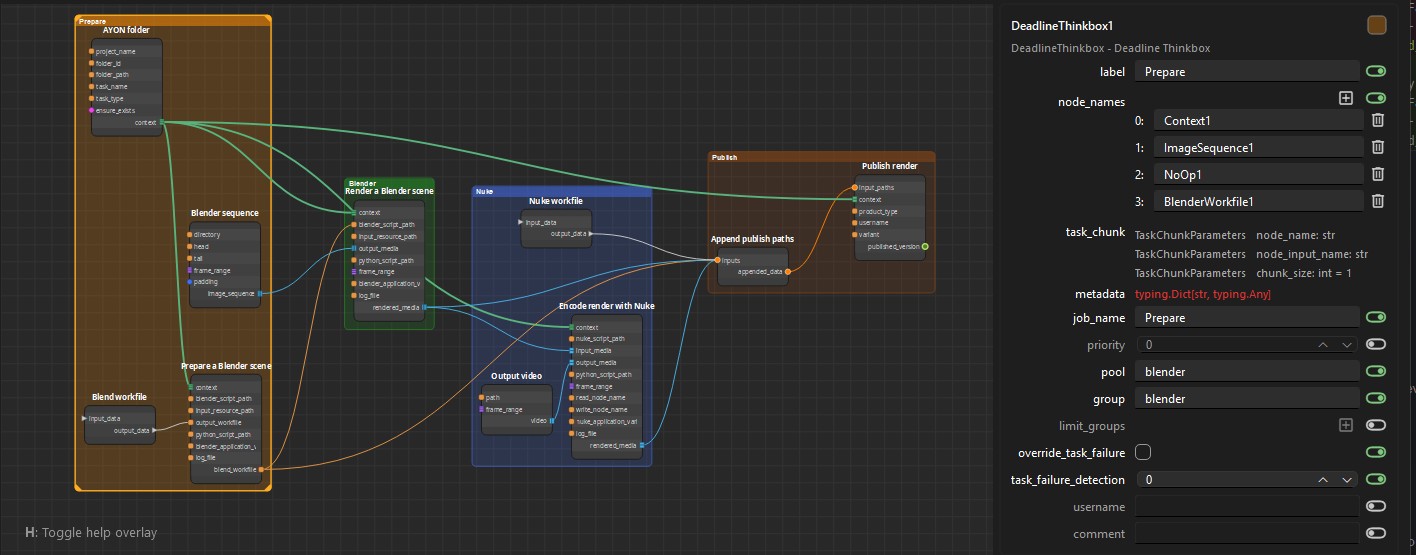
- Create visual workflows using a browser-based node graph editor
- Chain complex operations across multiple DCCs (Blender, Nuke, publish, etc.)
- Build tailor-fit and reusable automation with custom nodes and plugins
- Execute your workflows locally or on render farms with automatic job splitting
- Handle failures gracefully with built-in revert mechanisms and resumable workflow execution
Think of it as a production-ready automation layer that sits on top of AYON.
Who is This For?
Technical Artists
Design and test complex workflows interactively using the browser-based graph editor. Chain renders across multiple DCCs, automate publishing, and orchestrate multi-step production tasks without writing code.
Pipeline TDs & Developers
Build custom automation tools and extend AYON's capabilities with existing or your own Python-based node plugins. Create reusable workflows that integrate seamlessly with AYON's pipeline without the overhead of render farm management, retry logic, and manual workflow orchestration.
Features
User Features: - Full python API available - Browser-based node editor: workflows can be authored, tested and executed interactively - Workflow serialization/deserialization as JSON file - Any AYON addon can register custom nodes - Workflow execution can be local, from backend, or distributed on supported renderfarms
Technical Components: - ayon_workflow.plugin_system - Plugin (node type) discovery from loaded addons - ayon_workflow.workflow_editor - Module with all the logic to edit workflows - ayon_workflow.workflow_execution - Execution engine powered by TaskFlow - ayon_workflow.plugins - Built-in node definitions - ayon_workflow.web_editor - Local FastAPI web editor runtime and launcher - Addon CLIs to edit/execute/dispatch workflows: ayon addon workflow --help - Browser editor launch: ayon addon workflow editor
User Guides
For step-by-step instructions on using the visual editor and managing your workflows, please refer to Workflow Addon - AYON Help Center
Development Docs and Guides
Head to our developer portal at the Workflow Addon Dev Docs. There you will find a quick start guide to help you build your first workflow, instructions for using the visual editor programmatically, breakdowns of the different execution modes, guidelines for developing with the workflow addon, and a tutorial on creating custom workflow nodes.
Demo Workflows
Users connected to an AYON Server can access demo workflows locally once the addon is downloaded by the Launcher. They are located at the following paths:
- Windows:
C:\Users\YOUR_USER\AppData\Local\Ynput\AYON\addons\workflow_X.X.X\ayon_workflow\plugins\demo\ - Linux:
~/.local/share/Ynput/AYON/addons/workflow_X.X.X/ayon_workflow/plugins/demo/ - macOS:
~/Library/Application Support/Ynput/AYON/addons/workflow_X.X.X/ayon_workflow/plugins/demo/